SofiaShop - Authentic Beauty Supply

Bookmark and Share
Showing posts with label make money online. Show all posts

Wednesday, January 27, 2010

How to Make Money with Blujay.com

As part of my journey to find financial freedom, I have started a small online business to sell beauty supply and my goal is to sell authentic products with reasonable price. I first listed my products on ebay.com but then decided to find ebay alternatives because ebay costs more than the profit I could make. It does not mean that I am totally against ebay. It is still a very good marketplace that I can use to promote my product. I will discuss this in another article.

In this article, I'd like to introduce blujay.com as one alternative to eBay.com . It offers many advantages including but not limited to 100% free market place, no listing fee, no commission, no charge of any kind. It's designed as a store front where you can list as many products as you like. You can offer both google checkout and paypal as payment methods.
The design is so easy and straight forward to work with and you can give it a try by following these simple steps:


  1. Go to blujay.com and click on Login/Register where you specify your user name, password, etc.
  2. After register completes, you can list your items immediately.
  3. You can create custom categories for your store or select universal ones from the list
  4. Add product description and image. Blujay does not have strict restriction on image size or dimension. It allows you to add up to 4 images per product.
  5. To save time, you can select 'Copy Ads' and modify the ads so that you don't have to enter data many times
  6. Blujay will submit your listings to Google product and it's a plus because your listings can be found easily with search engine.
  7. You will get email notification when an item is sold. And you can view your order and update your status and contact your customer, etc.
  8. Blujay is simple, but sufficient for you to start your business. You don't need a sophisticated tool to start your small business while you have not made enough project to cover the cost piling up on the other side.
  9. One drawback of blujay is that it does not have feedback system where buyers can rate sellers. This feature is really a must for some sellers and who need that would also try ecrater. I have an article on ecrater as well.
If you have shopping mood today, visit my stores and my blog and let me know what you think: http://sofiashop.blujay.com or http://sofiashop.ecrater.com/ or http://financialfreedomwish.blogspot.com/ 

Tuesday, January 26, 2010

How to Make Money by Selling Book on Half.com

Many of you may have read my previous articles about How to Sell Books on Amazon. This article is its extention. If you have been in the book selling business, you know how important it is to attract more customers or in other words, to increase your sales.
One way to do that is to increase your market presence. I am already a seller on Amazon and now I am expanding book selling business to Half.com.
It's an Ebay own company, however, it's totally FREE to list book and only collects commission if the item is sold. And you can list books, textbook, movies, music, games, etc. To start selling on Half.com, you can follow simple steps below:


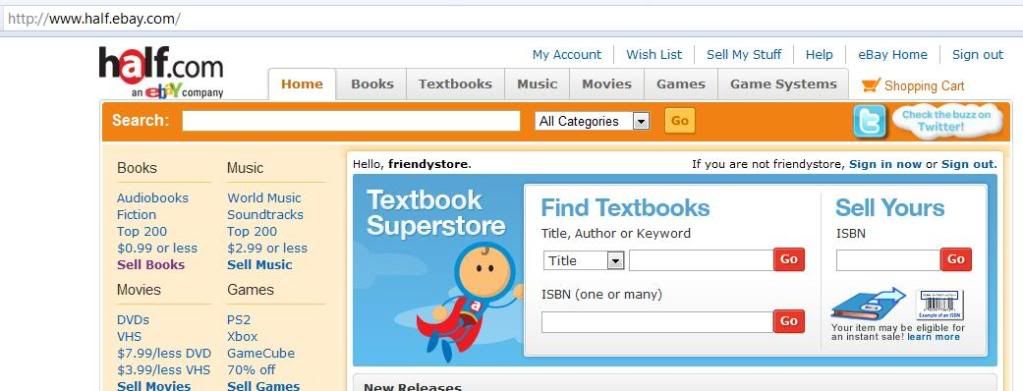
  1. Register to be a seller on Half.com: Even though you have Ebay ID, you still need to register as a seller on Half.com. Go to http://www.half.ebay.com/, click on My Account link at the top of the page to log in to your account. you can use the same user Ebay name/password for Half.com
  2. Click the "Start Selling Now" link in the "Selling" box on the left side of the page.
  3. You need to enter credit card and phone to verify your identity
  4. Enter your direct deposit information so you can receive payments. It's your checking account. Half.com will not deposit to saving account.
  5. Choose the shipping methods. You have to support Media Mail, but you can also offer Expedited Mail. You will get shipping credit reimbursement depending on the shipping method.
  6. Click on "Register" and it's done.
  7. You can start listing right after registration and you can do a single listing or multiple listings or bulk listings.
  8. You also have option to list books on Ebay marketplace as well, but you have to be Business or Premium verified Paypal account (you have to pay a small fee). And listing fee may apply if item is sold on eBay.
  9. The good thing is, your feedback for Half.com will be counted as Ebay feedback, so it really increases your Ebay reputation if you do good on Half.com
  10. When your item is sold, Half will charge commission and what you will receive is selling price of item sold - commission + shipping reimbursement. For more commission rate:  http://pages.half.ebay.com/help/seller/getpaid.html
Remember you have to pay the extra if your shipping cost is more than your shipping credit. For more infohttp://pages.half.ebay.com/help/seller/fulfill.html

Half.com is currently available on US only, so US residents, take your advantage now.

Monday, December 21, 2009

How to Make Passive Income by Writing for eHow

I've heard about eHow a while ago but I was skeptical. At last I decided to give it a try. It turns out to be true and I made my first few bucks in just a week with a few simple articles. How awesome it is! See my proof:


If you want to earn some extra cash or passive income working from home, write for eHow. Many people even making a living just by writing for ehow. Here are some simple steps to begin:
  1. Go to www.ehow.com and register for an account. It's Free. You don't have to pay a dime. But you need to give your tax information. You can start writing right after registration.
  2. Pick a topic that you have in mind. You can write about what you like or your hobbies. I think it is best to write what you like because your articles will turn out great and it will attract more readers. But if you don't have a topic in mind, do not worry. Ehow gives you a list of requested topics you can write about. Ehow will embed ads into your articles. The more people view ads, the more money you make. Think about it.
  3. Use simple sentences, words. You don't need to follow academic grammar rule. Be simple and informative. That's what readers want.
  4. Remember to put keywords in your articles. Think about what people will search in Google or Yahoo. If you use the right keywords, you will attract more readers. That's how you make more money.
  5. Find pictures for your articles. Pictures mean thousand words. You can post your photos or find some relevant photos on the internet as long as you cite it correctly. However, photo is not required.
  6. After completing your articles, you should put them in correct categories. You can add many categories as they are applicable to.
  7. And finally you can add keywords to the keyword section. Remember to use keywords in each step as well.
  8. After submitting your article, eHow will review and publish it, usually 1-2 days. And you can revise it as frequent as you want.

It usually takes me 10-15 minutes for a article and these articles keep generating money for me. (See my eHow on the right hand side.) I really enjoy eHow. Give it a try and you won regret. Good luck.


Bookmark and Share

Sunday, December 13, 2009

Make Money by Selling Used Books on Amazon

Did you know that you can make money by selling used books on Amazon?
Yes, it's true and it's what I am doing as another step to my financial freedom. My husband bought a lot of books and after one or two readings, they sit on the shelf forever. I did donate them to Goodwill a couple of times and then I found a better way to get back some cash and save money to buy new ones. This keeps my book budget low but does not cut on my reading.


  • Amazon offers an easy and free way for you to sell used books. It takes only a few minutes and cost nothing for a basic account. 
  • If you don't have account with Amazon yet. Go to Amazon.com and sign up for one. You will need a valid credit card number and billing address to be a seller on Amazon. 
  • A valid phone number is also required. Amazon will call you and ask you to enter the pin number. This number will display when you submit your application. The verification takes only a few second after you enter your pin. You can then start selling immediately. 
  • You can select which books you want to sell. And enter ISBN number found from the back of your book to Amazon. It will search from the database and display the book. All you need to do is to enter price and condition information. And then submit your listing. 
  • To increase your selling chance, you may want to list with the lowest offer price. 
  • If your book is sold, you will receive a notification email. Then you can package and ship using media mail. Amazon give you 3.99 credit for each shipment. So you don't have to worry about shipping cost.
  • Amazon will collect a commission about 15% from your selling price if it is sold. It costs nothing if the book is not sold for 60 days. Your listing will end and you will have option to re-list. 
  • You always can increase your inventory by buying used books from garage sells or from thrift store. Goodwill is also a great place and I got $1 for a book and sold for $10. What a great deal!
  • Give it a try and you will surely find it useful.
I've started around 2 months and here is my performance.


I am not making any money posting this since Amazon does not offer referral program. But because it helps me a bit financially so I think it is helpful to you too. 
As a work at home mom, nothing is better than making money but take less time to manage it.
If you would like to help me. You may buy from my Amazon store on the right hand side or from my book store Ezhello.


Bookmark and Share

Sunday, October 11, 2009

Make Money to View Ads - Top 5 Free Paid to View Ads Sites

Continue with my first step to financial freedom (see my post Make Money from Free Online Survey - Top 5 Free Only Survey), this post is my second step to it. I went online and digg into another stream of online income: Paid to View Ads. Yes, you get paid to view ads.
You can join the following FREE, click to view ads for 30 sec each and get paid. Paying range varies, but ranging from 1 cent to 15 cent. But it adds up. Here are my top rated sites:


My Rank
Name
How to Earn
Cost
Try Now
1


YouData
view ads, affiliate


FREE
Try Now
2


ClixSense
view ads, affiliate


FREE
Try Now
3
WordLinx - Get Paid To ClickWordLinx
view ads, affiliate

FREE
Try Now
4
MatrixMails - Get paidMatrixMails
view ads, affiliate, read email


FREE
Try Now
5


NeoBux  (referrer = ezhello)
view ads, affiliate


FREE
Try Now


Bookmark and Share